こんなこと思ったことない?

タスク
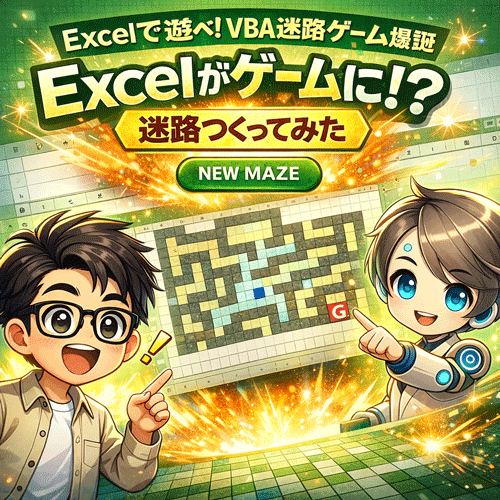
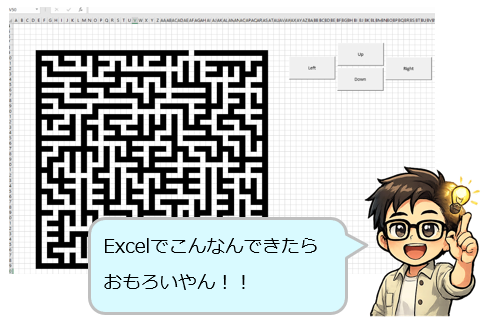
なぁジッピー…Excelで迷路ゲームとか作れんの?
なんかこう…ちょっと遊べるやつ。

ジッピー
いけるで。
タスク
え、ほんまに?
ジッピー
しかもな…ボタン一個でいける
タスク
なんそれ?意味わからんけど神やんw
ジッピー
テンプレ作ったで👇ダウンロードや!
やることはたったこれだけ
ジッピー
説明するで、ちゃんと聞けよ?
- シートを1枚用意
- 名前を「迷路」にする
- ボタンを1個作る
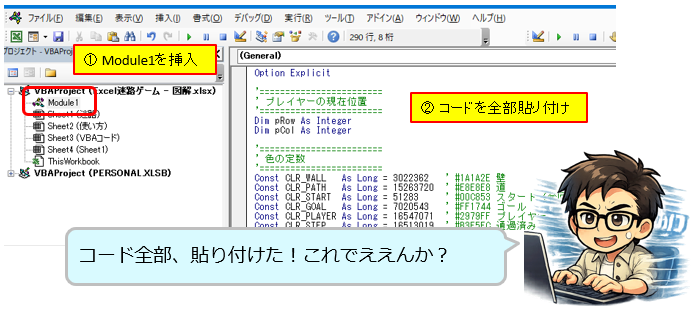
- 下のコードを貼り付ける
タスク
は?簡単すぎるやろw
ジッピー
コードはこれや👇
'========================
' プレイヤーの現在位置
'========================
Dim pRow As Integer
Dim pCol As Integer

'========================
' 色の定数
'========================
Const CLR_WALL   As Long = 3022362   ' #1A1A2E 壁
Const CLR_PATH   As Long = 15263720  ' #E8E8E8 道
Const CLR_START  As Long = 51283     ' #00C853 スタート(今回は未使用)
Const CLR_GOAL   As Long = 7020543   ' #FF1744 ゴール
Const CLR_PLAYER As Long = 16547071  ' #2979FF プレイヤー
Const CLR_STEP   As Long = 16513019  ' #B3E5FC 通過済み

'========================
' 迷路サイズ
'========================
Const MAZE_ROWS As Integer = 25
Const MAZE_COLS As Integer = 45

'===================================================
' ゲーム開始
'===================================================
Sub StartGame()

    Dim ws As Worksheet
    Set ws = ThisWorkbook.Sheets("迷路")

    ' 以前のプレイヤー跡を軽く整える
    If ws.Cells(2, 2).Interior.Color <> CLR_GOAL Then
        ws.Cells(2, 2).Interior.Color = CLR_PLAYER
    End If

    ' プレイヤーをスタート位置に配置
    pRow = 2
    pCol = 2
    ws.Cells(pRow, pCol).Interior.Color = CLR_PLAYER
    ws.Cells(pRow, pCol).Value = ""

    ' プレイヤー位置へ移動
    ws.Activate
    ws.Cells(pRow, pCol).Select

    ' 矢印キーを割り当て
    Application.OnKey "{UP}", "MoveUp"
    Application.OnKey "{DOWN}", "MoveDown"
    Application.OnKey "{LEFT}", "MoveLeft"
    Application.OnKey "{RIGHT}", "MoveRight"

    MsgBox "ゲームスタート!" & vbCrLf & _
           "矢印キーで青いセルを動かしてね!" & vbCrLf & _
           "赤いGを目指せ!"
End Sub

'===================================================
' ゲーム終了
'===================================================
Sub StopGame()

    Application.OnKey "{UP}"
    Application.OnKey "{DOWN}"
    Application.OnKey "{LEFT}"
    Application.OnKey "{RIGHT}"

    MsgBox "ゲームを終了しました。矢印キーを元に戻しました。"
End Sub

'===================================================
' プレイヤー移動
'===================================================
Sub MovePlayer(dr As Integer, dc As Integer)

    Dim ws As Worksheet
    Set ws = ThisWorkbook.Sheets("迷路")

    Dim newRow As Integer
    Dim newCol As Integer
    Dim targetColor As Long

    newRow = pRow + dr
    newCol = pCol + dc

    ' 範囲外チェック
    If newRow < 1 Or newRow > MAZE_ROWS Then Exit Sub
    If newCol < 1 Or newCol > MAZE_COLS Then Exit Sub

    targetColor = ws.Cells(newRow, newCol).Interior.Color

    ' 壁なら進めない
    If targetColor = CLR_WALL Then Exit Sub

    ' ゴール判定
    If targetColor = CLR_GOAL Then
        ws.Cells(pRow, pCol).Interior.Color = CLR_STEP
        ws.Cells(pRow, pCol).Value = ""

        ws.Cells(newRow, newCol).Interior.Color = CLR_PLAYER
        ws.Cells(newRow, newCol).Value = "★"
        ws.Cells(newRow, newCol).Font.Bold = True
        ws.Cells(newRow, newCol).Font.Color = RGB(255, 255, 255)
        ws.Cells(newRow, newCol).HorizontalAlignment = xlCenter
        ws.Cells(newRow, newCol).VerticalAlignment = xlCenter

        pRow = newRow
        pCol = newCol

        ' 矢印キー解除
        Application.OnKey "{UP}"
        Application.OnKey "{DOWN}"
        Application.OnKey "{LEFT}"
        Application.OnKey "{RIGHT}"

        MsgBox "クリア!おめでとう!!" & vbCrLf & vbCrLf & _
               "もう一度遊ぶ → NewMaze を実行してね"
        Exit Sub
    End If

    ' 元の位置を通過済みに
    If ws.Cells(pRow, pCol).Interior.Color = CLR_PLAYER Then
        ws.Cells(pRow, pCol).Interior.Color = CLR_STEP
        ws.Cells(pRow, pCol).Value = ""
    End If

    ' 新しい位置へ移動
    ws.Cells(newRow, newCol).Interior.Color = CLR_PLAYER
    ws.Cells(newRow, newCol).Value = ""
    pRow = newRow
    pCol = newCol

    ' 見える位置へスクロール
    Application.Goto ws.Cells(pRow, pCol), False
End Sub

Sub MoveUp()
    MovePlayer -1, 0
End Sub

Sub MoveDown()
    MovePlayer 1, 0
End Sub

Sub MoveLeft()
    MovePlayer 0, -1
End Sub

Sub MoveRight()
    MovePlayer 0, 1
End Sub

'===================================================
' 新しい迷路を生成
'===================================================
Sub NewMaze()

    Dim ws As Worksheet
    Dim r As Integer
    Dim c As Integer
    Dim rows As Integer
    Dim cols As Integer
    Dim maze() As Integer

    ' 矢印キー解除
    Application.OnKey "{UP}"
    Application.OnKey "{DOWN}"
    Application.OnKey "{LEFT}"
    Application.OnKey "{RIGHT}"

    Set ws = ThisWorkbook.Sheets("迷路")

    Application.ScreenUpdating = False
    Randomize

    rows = MAZE_ROWS
    cols = MAZE_COLS

    ' 全部壁にする
    For r = 1 To rows
        For c = 1 To cols
            ws.Cells(r, c).Interior.Color = CLR_WALL
            ws.Cells(r, c).Value = ""
        Next c
    Next r

    ' 配列初期化(1=壁、0=道)
    ReDim maze(1 To rows, 1 To cols)

    For r = 1 To rows
        For c = 1 To cols
            maze(r, c) = 1
        Next c
    Next r

    ' 開始位置から穴掘り
    Call CarveMaze(maze, 2, 2, rows - 1, cols - 1)

    ' Excelに反映
    For r = 1 To rows
        For c = 1 To cols
            If maze(r, c) = 0 Then
                ws.Cells(r, c).Interior.Color = CLR_PATH
            Else
                ws.Cells(r, c).Interior.Color = CLR_WALL
            End If
        Next c
    Next r

    ' スタート地点
    ws.Cells(2, 2).Interior.Color = CLR_PLAYER
    ws.Cells(2, 2).Value = ""

    ' ゴール地点
    ws.Cells(rows - 1, cols - 1).Interior.Color = CLR_GOAL
    ws.Cells(rows - 1, cols - 1).Value = "G"
    ws.Cells(rows - 1, cols - 1).Font.Bold = True
    ws.Cells(rows - 1, cols - 1).Font.Color = RGB(255, 255, 255)
    ws.Cells(rows - 1, cols - 1).Font.Size = 7
    ws.Cells(rows - 1, cols - 1).HorizontalAlignment = xlCenter
    ws.Cells(rows - 1, cols - 1).VerticalAlignment = xlCenter

    ' プレイヤー位置リセット
    pRow = 2
    pCol = 2

    Application.ScreenUpdating = True

    ' 矢印キー再設定
    Application.OnKey "{UP}", "MoveUp"
    Application.OnKey "{DOWN}", "MoveDown"
    Application.OnKey "{LEFT}", "MoveLeft"
    Application.OnKey "{RIGHT}", "MoveRight"

    ws.Activate
    ws.Cells(2, 2).Select

    MsgBox "新しい迷路を生成しました! 矢印キーでスタート!"
End Sub

'===================================================
' 穴掘り法(再帰)
'===================================================
Sub CarveMaze(maze() As Integer, r As Integer, c As Integer, rows As Integer, cols As Integer)

    Dim dirs(1 To 4, 1 To 2) As Integer
    Dim i As Integer
    Dim j As Integer
    Dim tmpR As Integer
    Dim tmpC As Integer
    Dim d As Integer
    Dim nr As Integer
    Dim nc As Integer

    maze(r, c) = 0

    ' 4方向(2マスずつ掘る)
    dirs(1, 1) = 0:  dirs(1, 2) = 2
    dirs(2, 1) = 0:  dirs(2, 2) = -2
    dirs(3, 1) = 2:  dirs(3, 2) = 0
    dirs(4, 1) = -2: dirs(4, 2) = 0

    ' シャッフル
    For i = 4 To 2 Step -1
        j = Int(Rnd() * i) + 1

        tmpR = dirs(i, 1)
        tmpC = dirs(i, 2)

        dirs(i, 1) = dirs(j, 1)
        dirs(i, 2) = dirs(j, 2)

        dirs(j, 1) = tmpR
        dirs(j, 2) = tmpC
    Next i

    ' 掘り進める
    For d = 1 To 4
        nr = r + dirs(d, 1)
        nc = c + dirs(d, 2)

        If nr >= 2 And nr <= rows And nc >= 2 And nc <= cols Then
            If maze(nr, nc) = 1 Then
                maze(r + dirs(d, 1) \ 2, c + dirs(d, 2) \ 2) = 0
                CarveMaze maze, nr, nc, rows, cols
            End If
        End If
    Next d
End Sub
タスク
いや長っ!!!
ジッピー
安心しろ、中身理解せんでええ。貼るのが仕事や😎
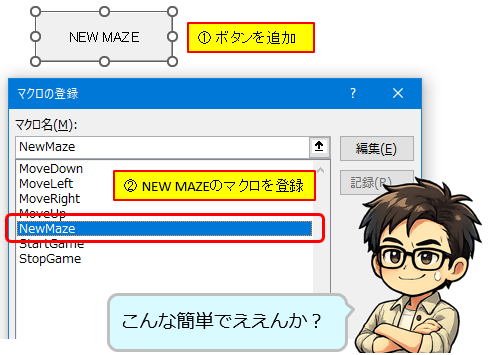
ボタン設定
ジッピー
ボタン設定はこれだけや
- 挿入 → フォームコントロール → ボタン
- マクロ「NewMaze」を割り当て
ジッピー
ボタン名はこれがおすすめ👇
👉NWE MAZE
タスク
それっぽいやんwww
遊び方
- ボタンを押す
- 迷路生成される
- 矢印キーで移動
ジッピー
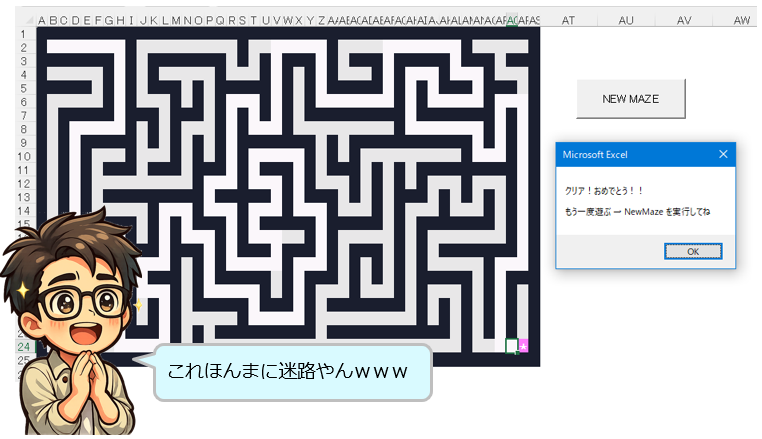
ピンクのマスがプレイヤーで赤いGがゴールや
👉到達したら勝ち。 以上や😆
やってみた結果
タスク
…これあかんわ
普通にハマるやつやんwwww
ジッピー
仕事中にやるなよ?
タスク
それは無理や😆
ジッピーの一言
ジッピー
Excelは表計算ソフトや
でもな、遊び出したら止まらんぞ😎
まとめ
ジッピー
👉Excel、ゲーム化完了